Search AI, and why I built it
Ajax Search Pro has always been powerful, and that power has a cost: there are a lot of options, and it is not always obvious which ones matter for your site. Over the years the most common support question has been some version of “I set it up, but the results are not quite right, what did I miss?”
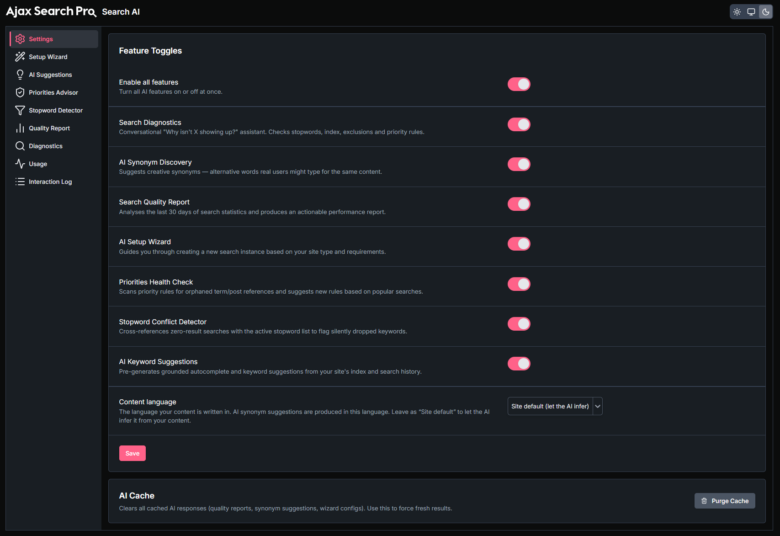
Search AI is my answer to that. It is a set of tools, sitting in their own admin menu, that look at your actual configuration and content and tell you what to do. There is no API key to paste and nothing extra to buy, and it stays switched off until you decide to turn it on. Every license includes 100,000 credits a month, and they renew automatically.
The tools
There are seven, and each one targets a real moment where people get stuck:
- Configuration Wizard. Walks you through creating an instance and applies a recommended setup, so a new search bar starts from a sensible place instead of a blank slate.
- Search Quality Report. Analyses an instance and lists concrete issues with recommendations. This is the one that answers “what did I miss?”
- Priorities Advisor. Reviews your priority rules and flags the quiet mistakes: orphaned terms, empty rules, misconfigured phrase logic, groups with no name.
- Synonym Discovery. Reads your content and suggests synonyms worth adding, which is one of the highest-impact things you can do for recall.
- Stopword Conflict Detector. Catches stopwords that clash with words you have actually indexed, a subtle problem that quietly hides results.
- Diagnostic Chat. Ask a question about your setup in plain language and get a guided answer based on your configuration.
- AI Keyword Suggestions. An AI-powered autocomplete source. When a suggestion comes from the AI, it gets a small sparkle badge in the front end so visitors (and you) can tell.
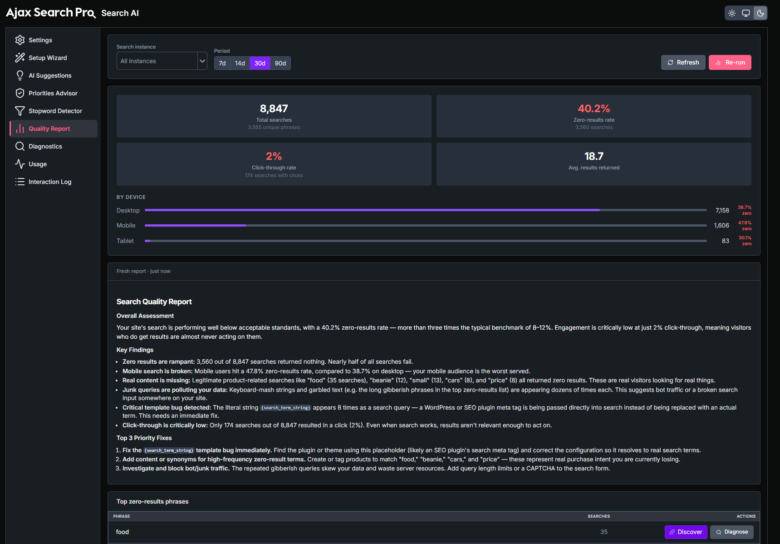
The short version: if you have ever wanted a second pair of eyes on your search config, that is now built in. Turn it on, run a quality report, and act on what it finds.
A rebuilt index table
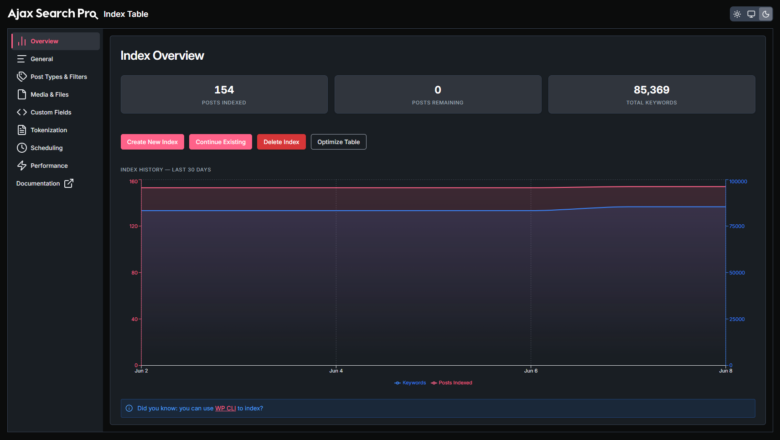
The index table is what keeps search fast on large sites, and in this release it got a new management interface and a new engine underneath. The overview panel now shows live indexing stats with a stop button and proper restart support, so you can actually see what is happening instead of staring at a spinner.
There is also an index-size history chart now, with daily snapshots recorded through REST, WP-CLI and WP-Cron, plus a keyword-count series alongside it. Re-indexing moved to a cursor-based approach, which is the change that matters most for big catalogs: it processes reliably instead of choking partway through. And you get new taxonomy-term and custom-field exclusion rules with AND/OR logic, so you can keep junk out of the index with precision.
Analytics, rebuilt around GA4
Analytics got a full rebuild. You can now configure multiple Google Analytics 4 events using a flexible items format, with eight event triggers to choose from (including a “try this” trigger), and two new template variables, {search_id} and {search_name}, for your event values. The old Google Analytics 3 path has been removed, since it is well past its end of life.
If you have been tracking search behaviour, this gives you cleaner, more flexible data to work with. If you have not, it is a good moment to start: knowing what people search for, and what returns nothing, is the fastest route to better results.
Priorities, reworked
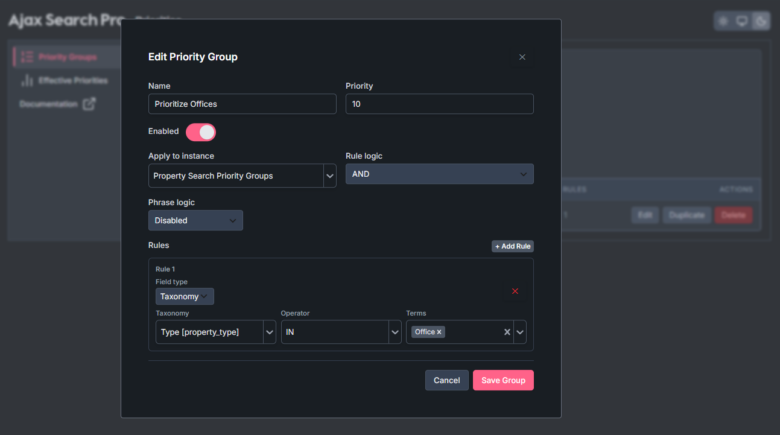
Individual priorities have been merged into priority groups through a new post rule type, which makes the whole system easier to reason about. Each group now has its own enable and disable toggle with a description, and there is multisite per-blog targeting if you are running a network.
The rest of it
Plenty more changed that is worth a mention:
- Smarter keyword suggestions. A new suggestion source backed by the search index surfaces the words closest to what someone typed, with typo and transposition correction, ranked by popularity.
- Reworked synonyms. Expansion is always bidirectional now, it applies to taxonomy term searches too, and the panel warns you when a change needs a re-index.
- A new searches block. A Gutenberg block that shows popular or latest visitor searches, replacing the old widgets.
- Faster taxonomy filtering. Search queries now use EXISTS / NOT EXISTS instead of nested sub-queries, which stops oversized queries from getting killed on some managed hosts.
- Modernized admin pages. The compatibility, maintenance and help pages were rebuilt on a React and REST architecture, with a reset-to-defaults option where it helps.
There is a longer list of fixes behind those, from a color-picker upgrade that sorts out a Safari bug to preventing fatal errors during updates caused by a stale autoloader. The full changelog has every line if you want it.
How to get it
If you are already a customer, update from your WordPress dashboard and you will have 4.29.0. Take a few minutes to open the new AI menu and run a quality report on your main search instance, it is the quickest way to see the value. If you are not a customer yet, you can try the full back-end in the live demo before deciding.
As always, if something does not behave the way you expect, the development repository and support system are the right places to reach me. A lot of what is in this release came from those conversations.